Sudheer Notes
Dark

Clawdbot isn’t perfect. Don’t try to make it perfect

Jan 28, 2026 11:05 pm

No AI chatbot is perfect. If we keep tinkering to achieve that perfect workflow where the chatbot works exactly as we need it to, it’s just gonna frustrate us more and we give up at the end.

Just focus on the workflow, how much time you can save from using that chatbot or any AI tool for that workflow. If you can save atleast 50% of the time that you would typically spend on that workflow, then it’s worth using that AI tool.

Create good enough workflows and automations using AI tools that’ll help you be more efficient with your time.

Clawdbot, like any other AI tool isn’t perfect. It makes mistakes and some times can frustrate you. But if you can actually save time on your work using Clawdbot, just use it as it is. Embrace its flaws and make it work for you as good as it can.

Maybe at some point in future we get that perfect chatbot or AI tool that does exactly what we want it to do, until then we gotta use the ones we got. This reminds me of how early smartphones were, ridiculed with bugs, slow speeds, low performance hardware and crappy cameras, but we used them and made them work. The things we do on smartphones that we have right now couldn’t even be comprehended 15 years back. AI tools are kind of in that state now. They are gonna get much better, faster and affordable to use. Until then we just have to embrace their flaws.
How to use clawdbot/moltbot effectively?

Jan 28, 2026 2:49 pm

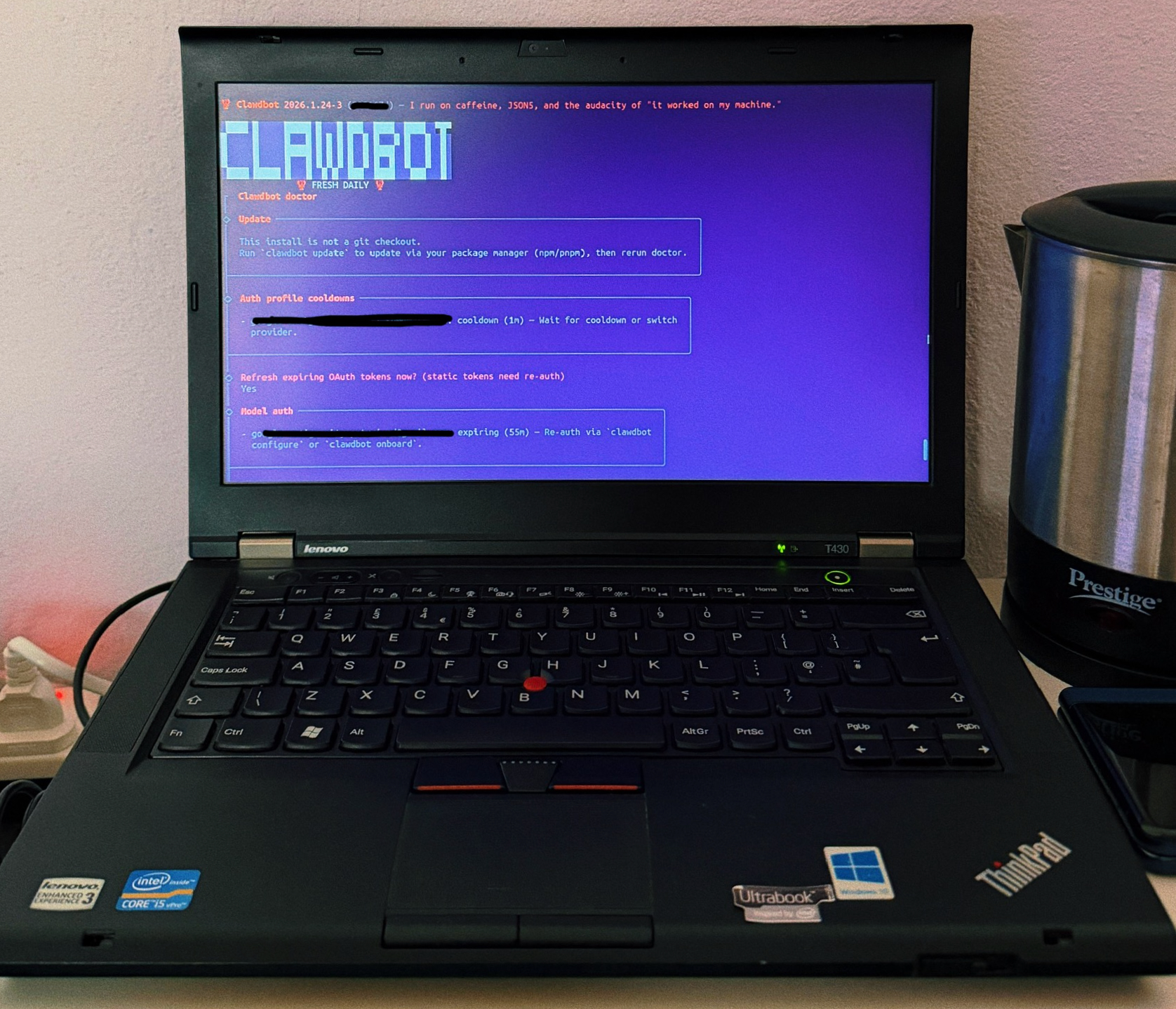
Clawdbot (aka Moltbot) is pretty good and you definitely don’t need a Mac mini to run it. I set it up on an old Thinkpad I got.

The best way to use this in my opinion is to define a problem you are trying to solve and create a workflow for it using clawdbot to automate the solution. One simple use case I set up is to auto create a time-blocked agenda for me every morning based on my calendar and tasks app. I gave it access to my Google Calendar and Google Tasks (where I dump everything). Clawdbot goes through these and creates an agenda for me every morning. I also setup it up to run the workflow every 30 mins to look for new tasks or changes and adjust my agenda accordingly. The agenda is auto created on a Notion page. And the workflow is bidirectional, whenever I mark something off on Notion, that’s updated on Google Tasks as well.

You might say why I need an agenda when I’m using a tasks app and a calendar already. The reason is to structure my day and use my time effectively. As I mentioned earlier, I dump everything into my calendar and tasks app. And I can only accomplish a few things everyday or else I burn myself out. Having that time blocked agenda makes it simpler to focus on things effectively.

If you can set up clawdbot properly with the right tools, it can be really useful to you.

Clawdbot/Moltbot running on an old ThinkPad T430

Couple of things to note about clawdbot/moltbot

Jan 28, 2026 2:46 pm

You can set it up on any machine you got, just don’t make it your primary machine. People are even setting it up on old smartphones. You definitely dont need a Mac mini for this.

Don’t try to do too much at once. Define a problem and see how you can automate a workflow using clawdbot for it. Lot of people right now are trying to do too much and doing nothing with it at the same time.

Be extremely careful when setting this up on a VPS. It’s best to set it up on any old hardware you got rather than on a cloud server.

I’ve been using it with Gemini 3 Flash and it’s pretty good so far. Gemini 3 Flash has a large context window which is useful for this.

Another thing, it doesn’t actually remember everything. It stores a summary of the chat everyday to its memory but I found it best to create .md files for specific workflows to help it with context. Don’t rely on a large chat, create instruction files for workflows once you clearly defined it and you are getting the output you want.

Make notes

Aug 24, 2025 11:56 pm

Share it or keep it private, it’s up to you. But make notes. Everyday we come across lots of cool things, inspirational stuff that we might forget later on. Making notes, just having something that could make us recall that moment and remember something from it, makes us feel that moment again. Your notes are fuel for your thoughts. Anytime you’re stuck or looking for some idea to work on, refer to your notes.

Wrong way to learn Digital Marketing

Aug 16, 2025 7:49 pm

These opinions are my own and I don’t mean to offend anyone or anything like that.

Doing courses is a bad way to learn DM

I got into DM without trying to get into it. I was looking for Data Science jobs after I graduated, I couldn’t get any, I saw an opportunity for DM internship and I just took it. From there on I continued my journey and built a career in DM.

The thing that made me stay in DM is the problem solving aspect of it. There are different things you could be doing in DM. Coming up with campaigns, working on how to 10x your leads and things like that. But for me, I liked looking at things from A to Z and figuring out the process; what are the critical components of this and how can I make this part better. That way I was able to bring some changes and improve the experience to the end user thereby increasing lead flow.

For me, figuring out stuff and fixing things is the reason I stayed in DM. I learnt a lot following this approach. I stumbled a lot too. There was this time when I completely broke the company’s website and ended up staying all night trying to fix it, I still couldn’t though, my boss fixed it eventually. But that experience taught me how not to do some things and the critical stuff I need to be aware of.

I wouldn’t have learned what I’ve learned by doing a course in the same amount of time. Courses teach you and make you think about how to do something right and to follow a process rather than just figuring things out. And that figuring things out part is really important for DM. Each company, each industry is unique. What worked for one might not work for another. You need to be able to adapt and figure stuff out. And the best way to learn that is by just building things, experimenting, breaking and fixing things.

Spend time tinkering with things rather than reading or viewing a lot of videos. Courses give you this streamlined approach to learn things but in reality, nothing is streamlined. Companies make choices that are not always thought out properly. Perfect companies don’t exist.

Courses can still teach you some stuff and by writing this, I’m not trying to steer you off of learning things your preferred way. Just don’t make completing a course your goal or objective. Learn things, and you can truly only learn by applying what you’ve studied. Spend more time on building things rather than just consuming information.

I hope I made some sense with this!

AI voice mode is a game changer for people who love learning

Aug 12, 2025 9:31 am

There’s this scene from Dune movie where Paul is learning about Arrakis from a voice interface device. Ever since I saw that, I thought this is a cool way to learn.

Some people enjoy learning by reading books. Over the years I’ve found that I like learning through conversation. If someone is explaining something to me and asking questions back and forth, that felt like a more interactive way to learn.

I tried voice mode on Perplexity, Gemini and Grok. Perplexity has the best voice mode in my opinion. Less delay and clearer understanding of what I was asking.

Ever since AI tools became mainstream, I thought how this might change learning in the future and I think voice mode gives a version of that reality. People will still read books and write things, but this interactive way of learning will make it much easy to make sense of hard concepts without needing a personal tutor.